
Scott International Procedures
Position reporting in Scott Plot® is performed either directly from route waypoints or through the Position Report Summary, which provides a consolidated view of all reports entered during the flight. All position reports are automatically captured in the completed Journey Logbook.
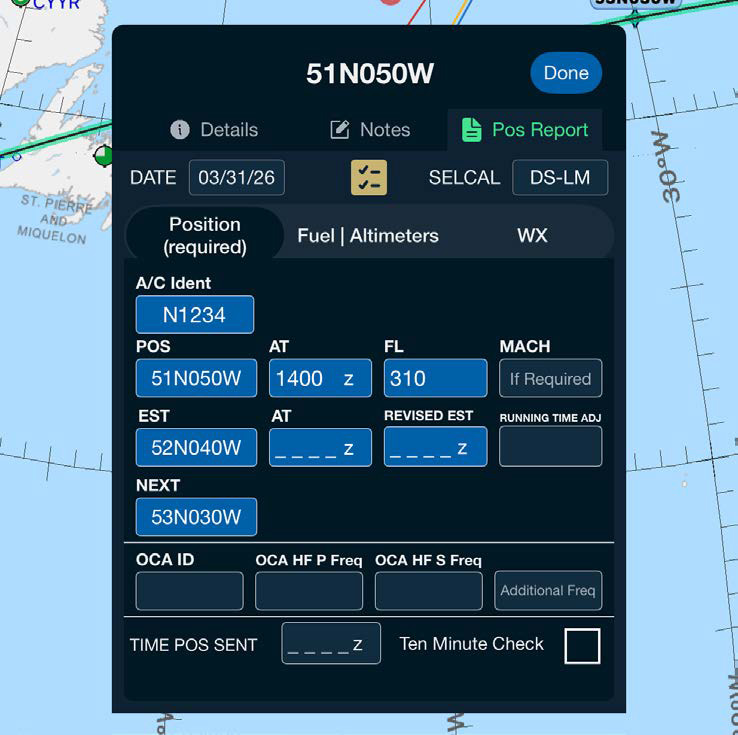
The Route Waypoint Position Report is the primary method for entering a position report. It can be accessed by tapping:
When opened, the position report form automatically populates key information, including aircraft identification, date, SELCAL (if available), waypoint position, and time. Remaining fields are intended to be entered from the aircraft FMS to ensure consistency with onboard navigation data.
Note: You can set the aircraft SELCAL value once in your portal account and the app will use it for each position report automatically. To add the SELCAL information for your aircraft, contact your Flight Department Admin or contact us at support@scottipc.com and we will add it for you.
Wind information is optional and should be entered only when required by ATC or when the operator desires historical data for the leg.
Fuel values in the position report may be entered using either:
Scott Plot accepts both formats and records the entered value in the position report and the Journey Logbook.
Note: Fuel burn units can be changed to KG by navigating to More > Settings & Options > Units > Weight.
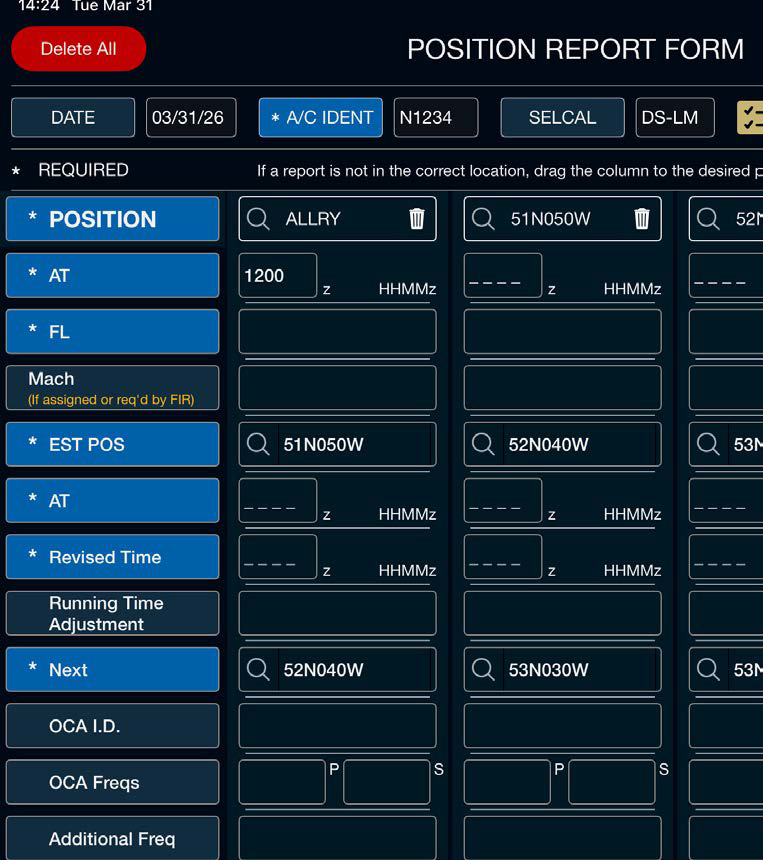
The POS Report Summary, accessed from the left vertical toolbar on the Scott Plot page, provides a consolidated view of all position reports entered during the flight. From the Position Report Summary, crews may:
Changes made in the summary view are reflected immediately and will be included in the completed Journey Logbook.
The position reporting system automatically associates the first 5-minute or 10-minute check following a waypoint with that waypoint's position report. When a 5- or 10-minute check is completed, a timestamp is captured and indicated within the position report.
All position reports, including fuel entries, timestamps, and associated 5/10-minute checks, are automatically captured in the final Journey Logbook Master Document upon flight closeout.
Note: The position report form uses the GPS to automatically fill in the AT time on the position report. Please verify this time against your FMS for accuracy.



